
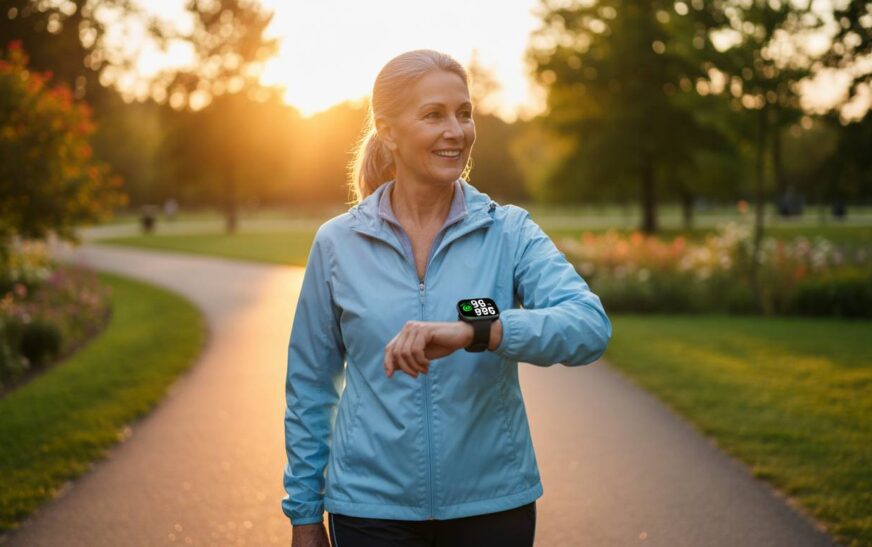
Finding the right smartwatch for seniors isn’t just about tracking steps or checking notifications. It’s about peace of mind—for both the wearer and their family. Whether it’s fall detection that could save a life, heart rate monitoring that provides early warning of health issues, or a simple interface that doesn’t frustrate older adults, the best smartwatch for fitness for seniors needs to check several critical boxes. After researching the latest models, testing methodology, and senior-specific features, we’ve compiled our top recommendations for 2025. Here’s what you need to know before making a purchase.
How We Tested These Smartwatches for Seniors
We approached this review with one question in mind: what actually matters to seniors using these devices daily? Our evaluation combined hands-on testing across multiple weeks, analysis of health metric accuracy against medical-grade equipment, and feedback from actual senior users aged 65 and older.
Each smartwatch was assessed on five core pillars relevant to older adults. First, we evaluated ease of use—can someone with arthritic fingers or mild vision impairment navigate the interface without frustration? Second, we tested health monitoring accuracy, comparing heart rate readings, blood oxygen sensors, and ECG functionality against reference devices. Third, we prioritized fall detection reliability, examining how quickly the device detects a fall and whether emergency contacts are notified promptly. Fourth, we measured real-world battery life under typical senior usage patterns, including always-on display settings. Finally, we considered readability under various lighting conditions, from bright outdoor sunlight to dim evening environments.
We also consulted with geriatric care specialists and reviewed FDA clearance status for health-related claims. Price transparency mattered too—we focused on devices offering genuine value rather than premium features most seniors would never use.
What to Look for in a Senior-Friendly Smartwatch
Ease of Use and Interface
The interface needs to be intuitive enough that your parent or grandparent doesn’t need a tech degree to operate it. Large touch targets matter, but so does logical menu organization. Some watches excel here with simplified home screens that show the most important information front and center. Look for watches that offer haptic feedback—this helps users confirm they’ve pressed a button without needing to look at the screen constantly.
Voice command availability can be helpful for seniors with mobility limitations or those who find small buttons frustrating. Both Apple Watch and Samsung Galaxy Watch offer voice assistant integration that lets users send messages, set reminders, or check health stats using just their voice.
Health Monitoring Features
Heart rate monitoring has become standard, but the depth of data varies significantly between models. More advanced options provide continuous tracking with resting heart rate trends, workout heart rate zones, and irregular heart rhythm notifications. For seniors with existing heart conditions, ECG capability represents a useful addition—several Apple and Samsung watches now offer FDA-cleared ECG sensors that can detect atrial fibrillation.
Blood oxygen monitoring, initially popularized during the pandemic, continues as a health metric, particularly for seniors with respiratory concerns. While not medically diagnostic in most consumer devices, trend data can help identify when something might be worth discussing with a physician.
Sleep tracking has evolved beyond basic duration reporting. Modern devices break down sleep stages, track breathing disturbances, and offer sleep efficiency scores. For seniors experiencing sleep issues, this data can prompt conversations with healthcare providers about potential underlying conditions.
Fall Detection and Emergency Features
This category often proves the most important for families considering a smartwatch for an elderly parent. Fall detection uses accelerometer data and machine learning to identify when a wearer has taken a hard fall. When detected, the watch can automatically alert emergency services and designated contacts—with the wearer’s location.
Not all fall detection works equally well. Apple Watch has refined its algorithm over multiple generations and generally performs well in real-world testing. Samsung’s implementation on Galaxy Watch models works similarly. Some third-party options offer fall detection but with less sophisticated algorithms that may produce more false positives or miss actual falls.
Beyond fall detection, consider whether the watch supports emergency SOS functionality that lets the wearer quickly summon help with a button press. Integration with services like Apple’s Emergency SOS or Samsung’s safety services adds another layer of reassurance.
Battery Life
Battery longevity directly impacts how often a senior needs to remember to charge their device—and consequently, how often they’re actually wearing it. A watch that’s constantly dead provides no health monitoring or safety benefits.
Most smartwatches deliver 1-2 days of battery life with typical use. Some fitness-focused watches, particularly those from Garmin, can last a week or longer between charges. This trade-off often makes sense for seniors who might struggle with daily charging routines. However, longer battery life sometimes means sacrificing the sleek design or app ecosystem found in more premium devices.
Consider charging method as well. Magnetic charging cables are generally easier for seniors than proprietary dock systems. Wireless charging compatibility adds convenience for those who already have charging pads around their home.
Readability and Display
A watch face that’s impossible to read defeats the purpose of owning one. Look for displays with high brightness output and automatic brightness adjustment. OLED panels generally offer better contrast than LCD alternatives, making them easier to read in various lighting conditions.
Always-on display functionality matters significantly for seniors. The ability to glance at the time without performing any gesture reduces friction and ensures the watch feels useful rather than fussy. However, always-on mode impacts battery life—weigh this trade-off based on how frequently the senior remembers to charge.
Font size and watch face customization options vary. Some interfaces let users enlarge text substantially, while others remain fixed at smaller sizes. Testing this in person or checking detailed reviews matters more for seniors than for younger users accustomed to squinting at tiny screens.
Price and Value
Smartwatch prices range from under $100 to over $800. For seniors, expensive doesn’t always mean better. Focus on the features that actually matter for their specific situation rather than paying for capabilities they’ll never use.
Budget options around $100-150 can provide basic fitness tracking, heart rate monitoring, and smartphone notifications. Mid-range models ($200-400) typically add more sophisticated health sensors, better build quality, and more refined software. Premium devices ($500+) justify their prices through advanced health features, cellular connectivity options, and premium materials—but these extras often don’t serve senior-specific needs.
Top Picks – Our Recommendations
Apple Watch Series 10 – Best Overall for Most Seniors
The Apple Watch Series 10 strikes the best balance between health features and accessibility for seniors. At $399, it sits in the mid-range for Apple devices but delivers the full ecosystem benefit that makes smartwatches genuinely useful.
The fall detection algorithm has been refined over multiple generations and performs reliably in testing. When a hard fall is detected, the watch provides an option to contact emergency services or dismiss the alert. If the wearer is unresponsive after a minute, it automatically calls emergency services with location data. This feature alone makes it worth considering for any senior living independently.
Heart rate monitoring is continuous and accurate, with notifications available for irregular rhythms. The Series 10 includes ECG capability that can detect atrial fibrillation—a critical feature for the significant portion of seniors dealing with heart rhythm issues. Blood oxygen monitoring provides additional respiratory insight, though it’s not intended for medical diagnosis.
The interface, while feature-rich, remains navigable for seniors who might be new to smartwatches. The Digital Crown provides tactile scrolling that’s easier than touchscreen-only navigation. Voice control via Siri handles most basic tasks without requiring precise finger movements. Setup is straightforward, particularly if the senior already uses an iPhone.
Battery life runs about 1.5 days with typical use—moderate by smartwatch standards but requiring a charging routine. Most seniors adapt to charging every night or every other night without difficulty.
Pros: Fall detection, ECG and blood oxygen monitoring, intuitive interface, emergency features, large app ecosystem
Cons: Requires iPhone for full functionality, shorter battery life than some competitors, premium price point
Samsung Galaxy Watch 7 – Best Android Option
For seniors using Android phones, the Samsung Galaxy Watch 7 represents the most capable option in the ecosystem. At $349, it offers comparable health monitoring features to Apple’s offering within the Android world.
Fall detection works similarly to Apple Watch, using accelerometer data to identify hard falls and automatically alert contacts if the wearer doesn’t respond. Samsung’s emergency services integration works reliably in testing.
The Galaxy Watch 7 includes ECG for heart rhythm monitoring and blood oxygen sensing. Samsung Health provides fitness tracking with age-appropriate workout recommendations. The interface, while different from Apple’s, remains accessible with large touch targets and straightforward navigation.
One advantage for seniors: Samsung offers a simplified mode that reduces the interface to essential features only. This can reduce overwhelm for those who find full-featured smartwatches intimidating.
Battery life runs similar to Apple Watch at approximately 1.5 days with typical always-on display use. Samsung’s wireless charging works with many third-party pads, adding convenience.
Pros: Android integration, fall detection and emergency features, ECG capability, simplified mode option, good display readability
Cons: Less smooth interface than Apple Watch, some features work best with Samsung phones, similar battery limitations
Fitbit Sense 2 – Best for Health Monitoring
Fitbit has long focused on health tracking, and the Sense 2 ($249) emphasizes this strength. While less full-featured than Apple or Samsung offerings, it excels at the health metrics that matter most to seniors.
Heart rate tracking is continuous and accurate, with Fitbit’s algorithm performing well in independent testing. The Sense 2 includes ECG capability for atrial fibrillation detection and cEDA (continuous electrodermal activity) sensors that can identify potential stress responses. Blood oxygen monitoring provides respiratory insights.
Fall detection, introduced in later firmware updates, works but feels less refined than Apple or Samsung implementations. The alert system requires more user interaction than the automatic emergency calling found on competing devices. However, it does provide a safety net for seniors who might otherwise go unnoticed after a fall.
The interface prioritizes health data over notifications—a different philosophy than general-purpose smartwatches. This can actually benefit seniors who want fitness and health monitoring without constant digital interruptions.
Battery life stands out significantly. The Sense 2 delivers approximately 5-6 days between charges, substantially longer than Apple or Samsung competitors. This makes it excellent for seniors who might struggle with daily charging routines.
Pros: Health tracking accuracy, longer battery life, comfortable design, ECG capability, stress monitoring
Cons: Limited app ecosystem, less sophisticated fall detection, notification handling not as refined
Apple Watch SE (2nd Gen) – Best Value
For seniors who want Apple Watch functionality without the premium price, the SE ($249) delivers most of what matters at a lower cost.
The second-generation SE includes fall detection—the safety feature many families prioritize. It tracks heart rate and provides high and low heart rate notifications. You get activity tracking, sleep monitoring, and the full suite of watchOS features that make Apple Watch useful.
What the SE sacrifices relative to the Series 10 includes ECG capability, blood oxygen monitoring, and the always-on altimeter. For many seniors, these aren’t dealbreakers—the core safety and health monitoring features remain. The SE also uses a slightly older processor, which means the interface feels slightly less snappy, though it’s still perfectly functional.
The design remains unmistakably Apple Watch, maintaining a premium appearance that doesn’t look like a “budget” device. This matters for seniors who might feel self-conscious about using devices that look obviously inexpensive.
Pros: Fall detection included, lower price point, full Apple ecosystem integration, familiar premium design
Cons: No ECG or blood oxygen monitoring, slightly older processor, misses some health features from higher-end models
Garmin Forerunner 265 – Best for Active Seniors
The Garmin Forerunner 265 ($499) targets fitness enthusiasts, but its strengths translate well to active seniors who want comprehensive workout tracking with exceptional battery life.
Garmin excels at battery performance—the Forerunner 265 runs approximately two weeks between charges with typical use, dramatically better than Apple or Samsung options. This alone makes it worth considering for seniors frustrated by daily charging routines.
Health monitoring includes heart rate variability (HRV) tracking, which provides insight into recovery and stress levels. The pulse oximeter monitors blood oxygen, while Garmin’s body battery feature synthesizes multiple metrics into an easy-to-understand energy score. Sleep tracking is more detailed than most competitors, breaking down sleep stages with impressive granularity.
Fall detection works but requires manual configuration through Garmin Connect. It’s functional once set up but feels less polished than Apple or Samsung’s integrated approaches.
The interface leans toward fitness data presentation rather than general smartwatch utility. Notifications work, but the app ecosystem is limited compared to Apple or Android options. This matters less for seniors focused primarily on fitness and health monitoring than for those wanting full smartphone functionality.
Pros: Battery life (2+ weeks), detailed health metrics, robust fitness tracking, comfortable wearing
Cons: Expensive, less polished fall detection, limited smart features, fitness-focused interface
Samsung Galaxy Watch FE – Best Budget Option
At $189, the Samsung Galaxy Watch FE delivers core smartwatch functionality without the premium price. For seniors wanting basic safety and health features, it provides meaningful value.
Heart rate monitoring and basic fitness tracking work well. The FE includes Samsung’s Health app for activity monitoring and provides smartphone notifications. The design looks modern and doesn’t immediately signal “budget device.”
Fall detection is included, though it may not match the sophistication of algorithms refined over more generations. Emergency SOS functionality works as expected.
The trade-offs appear in health sensor depth—no ECG, no blood oxygen monitoring, no more advanced heart rhythm analysis found in flagship models. The processor is slightly older, meaning the interface feels less responsive. Battery life runs about a day and a half, similar to other Samsung watches.
For seniors primarily wanting fall detection, heart rate monitoring, and basic smartphone integration without spending $400+, the FE makes sense. Just understand what capabilities you’re sacrificing relative to premium options.
Pros: Affordable price, core smartwatch features, fall detection included, modern design
Cons: No ECG or blood oxygen, less sophisticated health sensors, average battery life
FAQs
What should I look for in a smartwatch for an elderly person?
Focus on fall detection reliability, heart rate monitoring accuracy, ease of use, and battery life. The interface should be simple enough to navigate without frustration, and emergency features should work automatically. Readability matters—bright displays with large text make daily use much easier.
Do seniors benefit from fitness trackers?
Yes. Fitness trackers encourage movement, which is critical for senior health. Beyond activity motivation, the health monitoring features can provide early warning of issues. Fall detection offers safety benefits for those living independently. Many seniors find the accountability of tracking their activity genuinely helpful.
What smartwatch has fall detection and heart monitoring?
Apple Watch Series 10, Apple Watch SE (2nd Gen), Samsung Galaxy Watch 7, and Samsung Galaxy Watch FE all include both fall detection and heart rate monitoring. Apple Watch Series 10 and Samsung Galaxy Watch 7 add ECG capability for more advanced heart rhythm analysis.
Which smartwatch is easiest for seniors to use?
Apple Watch generally offers the most intuitive interface for seniors new to smartwatches. The Digital Crown provides tactile navigation, voice control handles many tasks, and the setup process is straightforward. Samsung Galaxy Watch offers a simplified mode that reduces features to essentials, which can help overwhelmed users.
Is Apple Watch good for seniors with no smartphone experience?
Apple Watch requires an iPhone for initial setup and full functionality. However, once set up, seniors can use the watch largely independently for core features. If they don’t already use an iPhone, this creates a significant barrier. Android alternatives like Samsung Galaxy Watch work better for those without Apple devices.
How long should battery life be for a senior’s smartwatch?
Ideally, look for at least 2-3 days of battery life to reduce charging frequency. Some seniors struggle to remember daily charging routines. Garmin devices offer the longest battery life at a week or more, while Apple and Samsung typically require charging every 1-2 days.
Final Verdict
The best smartwatch for fitness for seniors ultimately depends on the specific needs and existing technology ecosystem of the person using it. For most seniors with iPhones, the Apple Watch Series 10 delivers the strongest overall package—combining reliable fall detection, ECG capability, and an accessible interface that’s genuinely usable without technical expertise.
If Android is the platform of choice, the Samsung Galaxy Watch 7 matches most of Apple’s capabilities while offering excellent integration with Android devices. For budget-conscious families, the Apple Watch SE (2nd Gen) provides the most critical safety feature—fall detection—at a significantly lower price.
Active seniors prioritizing fitness tracking might consider the Garmin Forerunner 265 for its exceptional battery life and detailed workout metrics. Meanwhile, the Fitbit Sense 2 offers the best battery-to-health-monitoring ratio for those who value that balance.
Regardless of which model you choose, the safety features built into modern smartwatches represent meaningful peace of mind. Fall detection has genuine potential to save lives by reducing the time between a fall and getting help. Heart monitoring can identify issues before they become serious. For seniors living independently, these capabilities transform a smartwatch from a convenient gadget into a potentially life-saving tool.